Know exactly when your projects will ship.
Match engineering bandwidth with project "level of effort" to ensure you'll meet your deadlines.
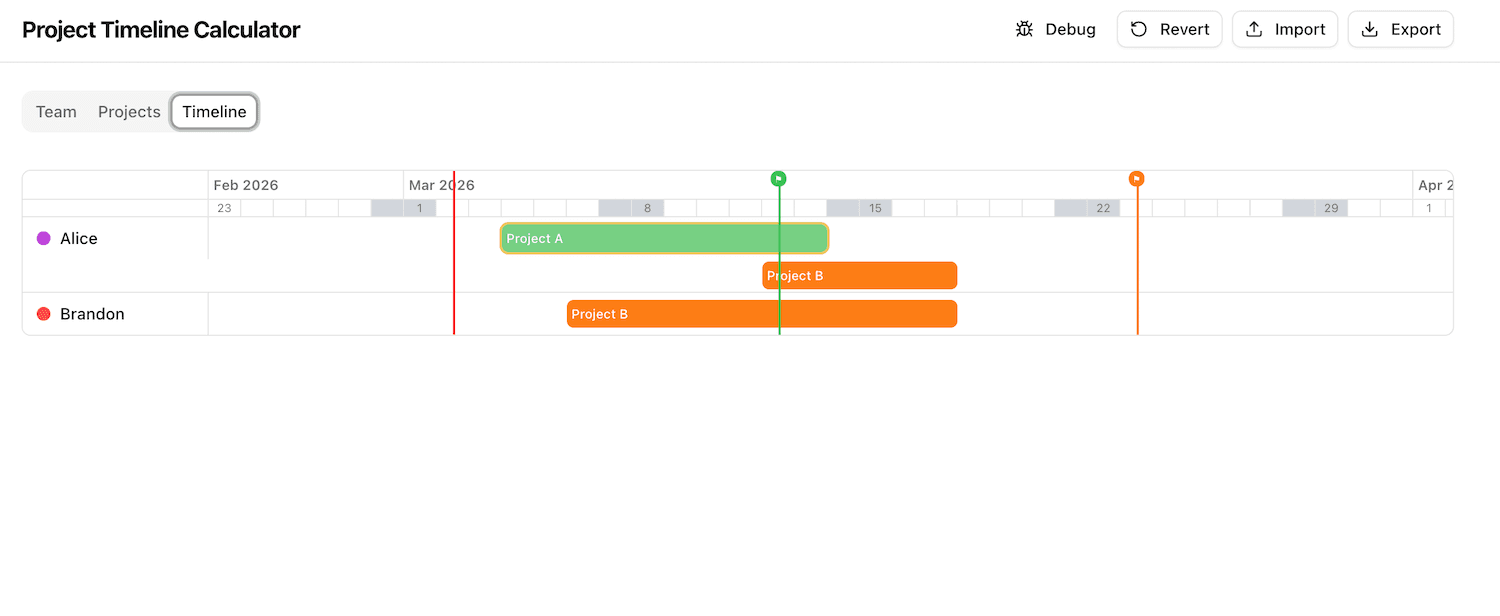
Planning project delivery is harder than it looks.
Engineering managers and project leads spend hours in spreadsheets trying to answer one question: Will we ship on time?
The Problem
Figuring out whether a project will finish on time given developer capacity, holidays, vacations, and story-point estimates — all changing mid-sprint.
Who Feels It
Engineering managers, project leads, and anyone responsible for planning and communicating delivery timelines to stakeholders.
The Cost
Missed deadlines, last-minute scrambles, and broken trust — or spending hours manually re-forecasting every time something changes.
How it works
Four simple steps from zero to a fully projected timeline.
Step 1
Add your team
Define developers, set their daily capacity (story points/day), and add their vacation schedules.
Step 2
Define projects
Set the project name, total effort estimate, remaining points, and an optional deadline.
Step 3
Assign & allocate
Assign one or more developers to each project with a start date and an optional end date.
Step 4
See projected timelines
The calculator calculates the end date day-by-day, accounting for capacity, vacations, and holidays.
Key features
Everything you need to forecast delivery with confidence.
Automatic timeline projection
Day-by-day capacity simulation that computes your real ship date — no guesswork.
Team capacity planning
Per-developer capacity, individual vacation calendars, and company-wide holidays all factored in.
Gantt chart visualization
See all your projects on a single interactive timeline to spot conflicts at a glance.
Deadline impact analysis
Instantly know which projects are at risk so you can act before a deadline is missed.
Import / Export JSON
Save your entire plan as a JSON file and share it with teammates or restore it later.
No backend required
Runs entirely in the browser. Your data never leaves your machine — full privacy by default.
Why this calculator?
Jira, Asana, and MS Project are powerful — but they're not built for quick, local, privacy-first timeline forecasting. Spreadsheets are flexible but tedious to maintain.
| Feature | This calculator | Jira | Asana | Spreadsheet |
|---|---|---|---|---|
| Free to use | ||||
| No account required | ||||
| Data stays local | ||||
| Built-in capacity simulation | ||||
| Vacation & holiday awareness | ||||
| Gantt + deadline risk analysis |
No signup. No subscription. No data collection. Just open it and start planning.
Frequently asked questions
Is my data stored on a server?
No. All data is stored locally in your browser's localStorage. Nothing is ever sent to a server.
Can I use this for my whole team?
Yes. Export your plan as a JSON file and share it with teammates. They can import it instantly — no account needed.
Does it handle holidays and vacations?
Yes. US federal holidays for 2026–2028 are pre-loaded, and you can add custom holidays. Each developer can also have individual vacation days that are excluded from capacity calculations.
What happens if a project is taking longer than expected?
Update the "Remaining points" field on the project. The calculator will immediately recalculate the projected end date based on the new estimate.
Can a developer work on multiple projects at a time?
Yes! If a developer is working on multiple projects in parallel, their capacity will be evenly split between the projects.
Ready to stop guessing?
Open the calculator now — no account, no install, no data collection.